/ docs/ARCHITECTURE.md
Full pipeline DAG,
per-process, with side-inputs.
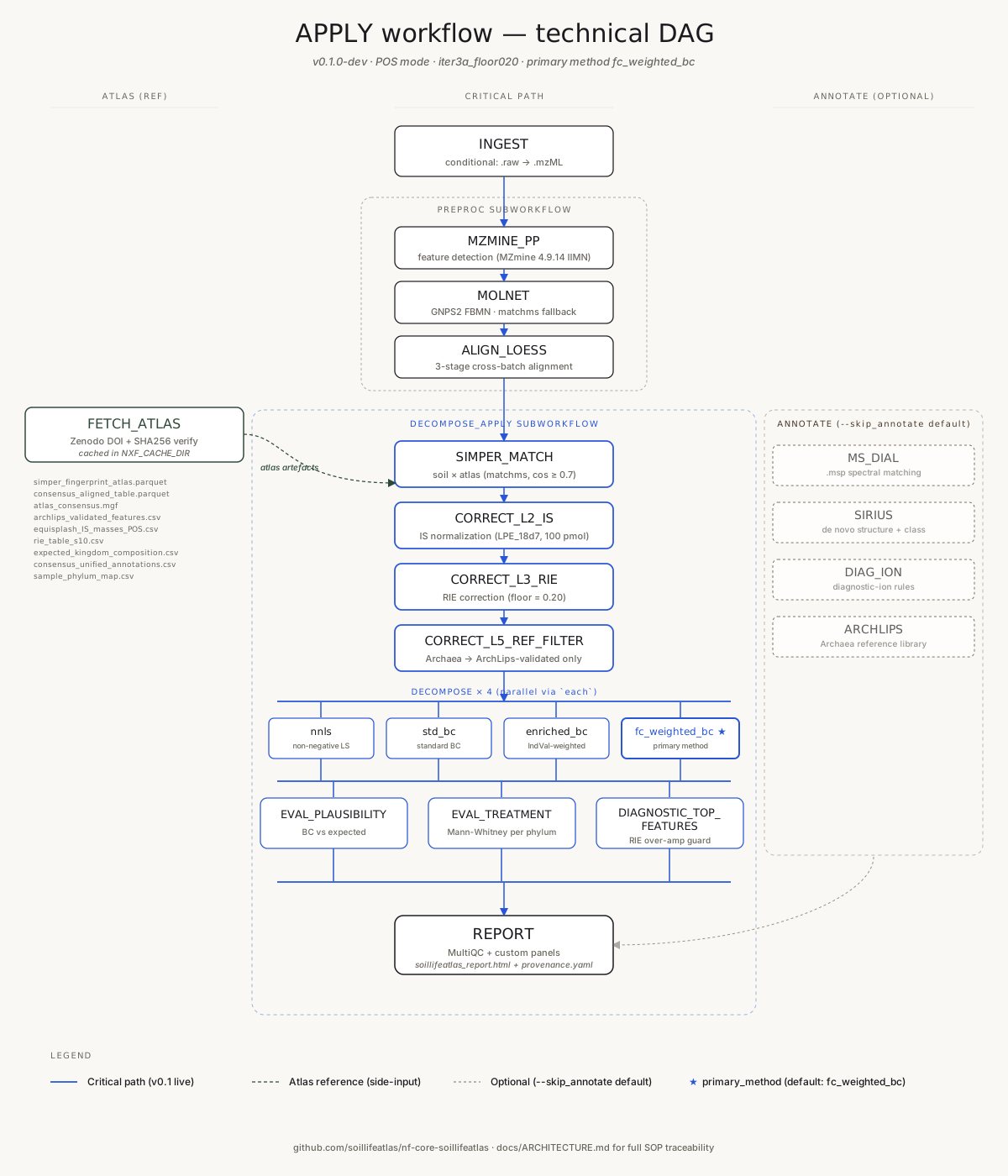
The home page shows the five-stage simplified view. This page shows the full technical DAG as Nextflow actually runs it — every process, every subworkflow, every side-input. The critical path is the Main column. The Atlas column feeds reference data from the Zenodo tarball. The Annotate column is an optional dimmed branch (--skip_annotate by default).
§ Reading the DAG
Each box is a Nextflow process; each process wraps one function in framework/*.py (plus its container digest and pinned atlas hash — see pipeline_info/provenance.yaml).
Solid black arrows are the critical path. Dashed soil-tone arrows are atlas side-inputs (reference data from the Zenodo tarball). The dimmed right column (ANNOTATE) runs only if you pass --skip_annotate false — decomposition does not depend on it. The ★ marks the primary decomposition method (default: fc_weighted_bc).
For full SOP-level traceability (every module ↔ function ↔ test ↔ SOP step) see the repository's ARCHITECTURE.md.